Your apps
Containers you run on your account, and the sites in front of them.
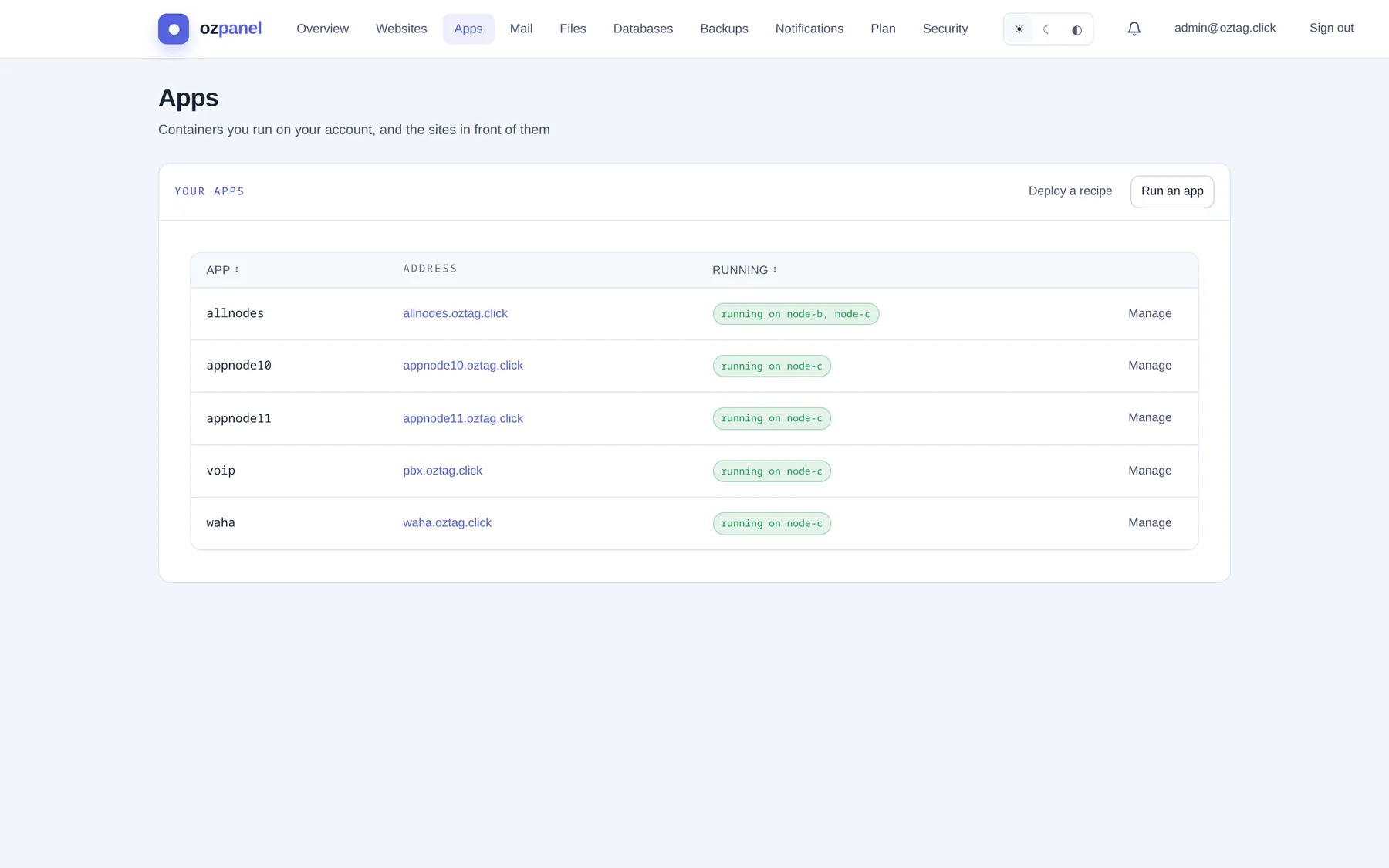
| Box / button | What it does |
|---|---|
| App | The app's name. |
| Address | The site in front of it. Click to open. |
| Running | Where it runs, e.g. running on node-b, node-c. Amber when not healthy. |
| Manage | Opens the app panel below the row. See Managing an app. |
| Deploy a recipe | A ready-made app. See Deploy a recipe. |
| Run an app | Your own image or program. See Run an app. |
Run an app
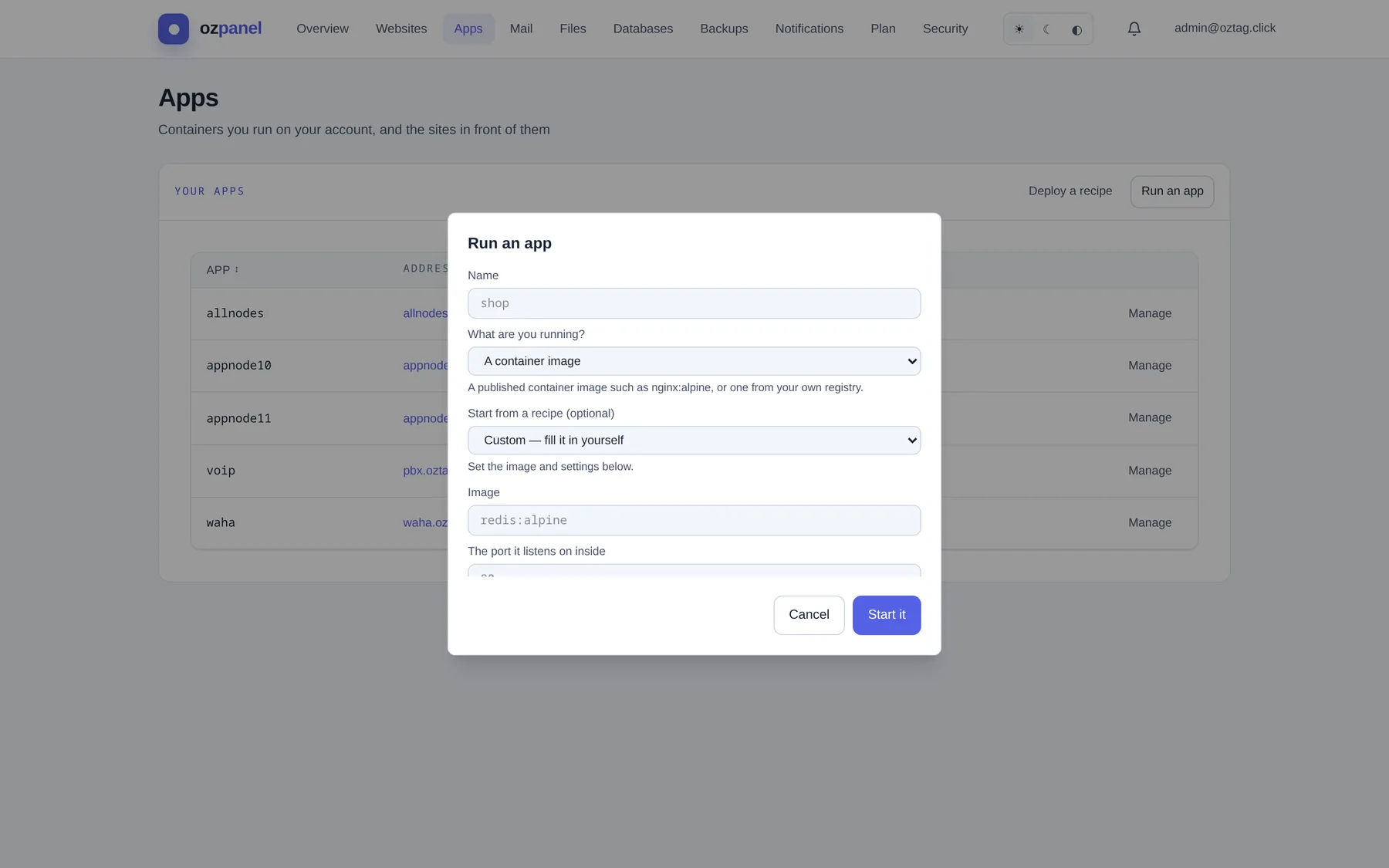
| Box / button | What it does |
|---|---|
| Name | Short, e.g. shop. Your own code lives in apps/<name>. |
| What are you running? | A container image (e.g. nginx:alpine) or A program on a port (Node, Python, a binary), run as your account. |
| Start from a recipe (optional) | Container only. Fills the form: WAHA — WhatsApp HTTP API, Redis — in-memory datastore, whoami — a tiny test server. Default Custom — fill it in yourself. |
| Image | Container. e.g. redis:alpine. Required. |
| Command to run | Program. e.g. node server.js. Required. |
| The port it listens on inside | Container. Its internal port, e.g. 80. Required. |
| The port your program listens on | Program. e.g. 3000. |
| Address to serve it at (optional) | A name for it, e.g. shop.example.com. Added as a domain; HTTPS automatic. |
| Command (optional) | Container. Overrides the image's own. |
| Files (working directory, optional) | Program. Defaults to your home. |
| Memory cap | Container. MB. Empty = plan default. |
| Image type | Published image (runs its own code) or My own code (mounted at /app): your apps/<name> folder. |
| Folders to keep | Add a folder: Folder in your account → Path in the container, optional read-only. Kept across restarts and node moves. None: data elsewhere is lost on restart. |
| Let this image write to its own filesystem | Off by default. Turn on only if the image fails read-only (nginx, Apache, Postgres). |
| Settings passed to it | One KEY=value per line. |
| Where it runs | All nodes (a copy on each) · One instance — moves to another node if one fails · Only node-x (pinned, does not move). Default: this node. |
| Start it | Creates and starts. Missing image, command or port: refused with the reason. |
Deploy a recipe
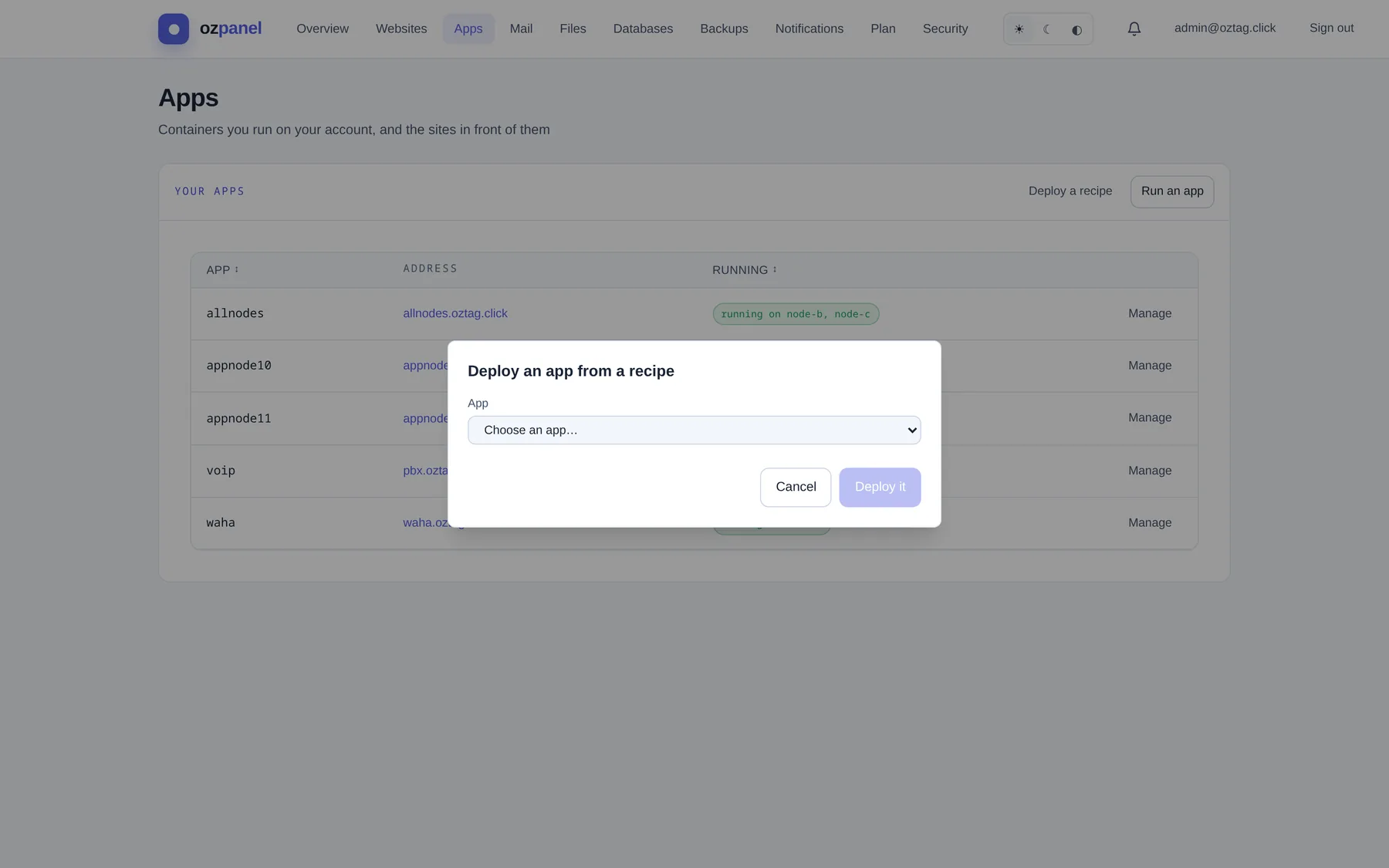
| Box / button | What it does |
|---|---|
| App | Choose from the catalogue. (unverified) marks untested recipes. |
| Name | Defaults to the recipe's key. |
| Variant | When the recipe has several. |
| Address (hostname) | When it serves the web, e.g. pbx.example.com. HTTPS by the platform. Registered for you. |
| Recipe settings | One box per setting. (optional) where not required. Strong passwords generated for you. |
| Needs a database | Some variants. Create it under Databases first. |
| It asks to open these ports | Extra ports it needs. An admin approves them before they go live. |
| Deploy it | Starts it. One instance, moves to another node if one fails. |
Managing an app
Manage on a row. Buttons on top, then details.

| Box / button | What it does |
|---|---|
| Terminal | A shell inside the container, in a new tab. Containers only, while running. |
| Start · Restart | Start when stopped; restart when running. |
| Stop | Stops now on its node. Comes back on the next check while enabled. |
| Turn off · Turn on | Off: stopped everywhere, stays stopped. Nothing deleted. |
| Repoint routing | Points the site at the container's current address. Use it when a warning says the site is not pointing at this container. |
| Edit | Change image, port, command, memory, folders, settings. Save changes. |
| Delete | Removes the app on every node. Your files stay. |
| Runs on | One instance — moves if a node fails or A copy on each selected node. Tick nodes. Apply — move it. Route and DNS follow. |
| CPU · Memory · Restarts | Live figures, with the node measured. |
| Configuration | Image, command, port, files, service, setting names. |
| Where it runs | Per node: running, failed, stray, uptime. Run here moves a one-instance app to that node. |
| The site in front of it | Address, certificate, DNS. Links: Site settings and certificate, Restrict access with a password. |
Image version
In Edit, containers only.
| Box / button | What it does |
|---|---|
| Pinned version | The exact version every node runs. Pinned at first start. |
| Check for updates | Asks the registry. Nothing changes. |
| Update to … | Moves every node to the new version. |
| Update this app automatically when its image tag gets a new version | Off by default. On: checked about hourly; the app restarts on every node. |
Ports & networking
| Box / button | What it does |
|---|---|
| Request a port | For non-web traffic: SIP, a game server, a raw TCP service. |
| Protocol | TCP or UDP. |
| Public port (what people connect to) | e.g. 5060. …up to for a range. |
| Port inside your container | e.g. 5060. …up to for a range. |
| How it should be served | A suggestion: HTTP website, TLS by hostname (SNI), Raw TCP/UDP via the proxy, Direct NAT (raw). The admin decides. |
| Hostname | For HTTP or SNI, e.g. sip.example.com. |
| Why you need it | Helps the admin decide. |
| Request | Nothing opens until an admin approves. Status: requested, approved, denied. |
| Revoke · Remove | Close an open port, or drop a pending request. |
Activity and logs
| Box / button | What it does |
|---|---|
| Activity | Events: started, stopped, failed, moved. Mark as seen on warnings. |
| Logs | The app's output, from the node running it. 50, 200 or 1000 lines. Refresh. |